
A little more insight. A lot less guesswork.
Your HVAC,
in clear view.
Two temperature probes. One clearer picture. Follow your HVAC’s supply, return, and temperature split — right from your iPhone.
For iPhone + compatible hardware. Free app with optional Premium.
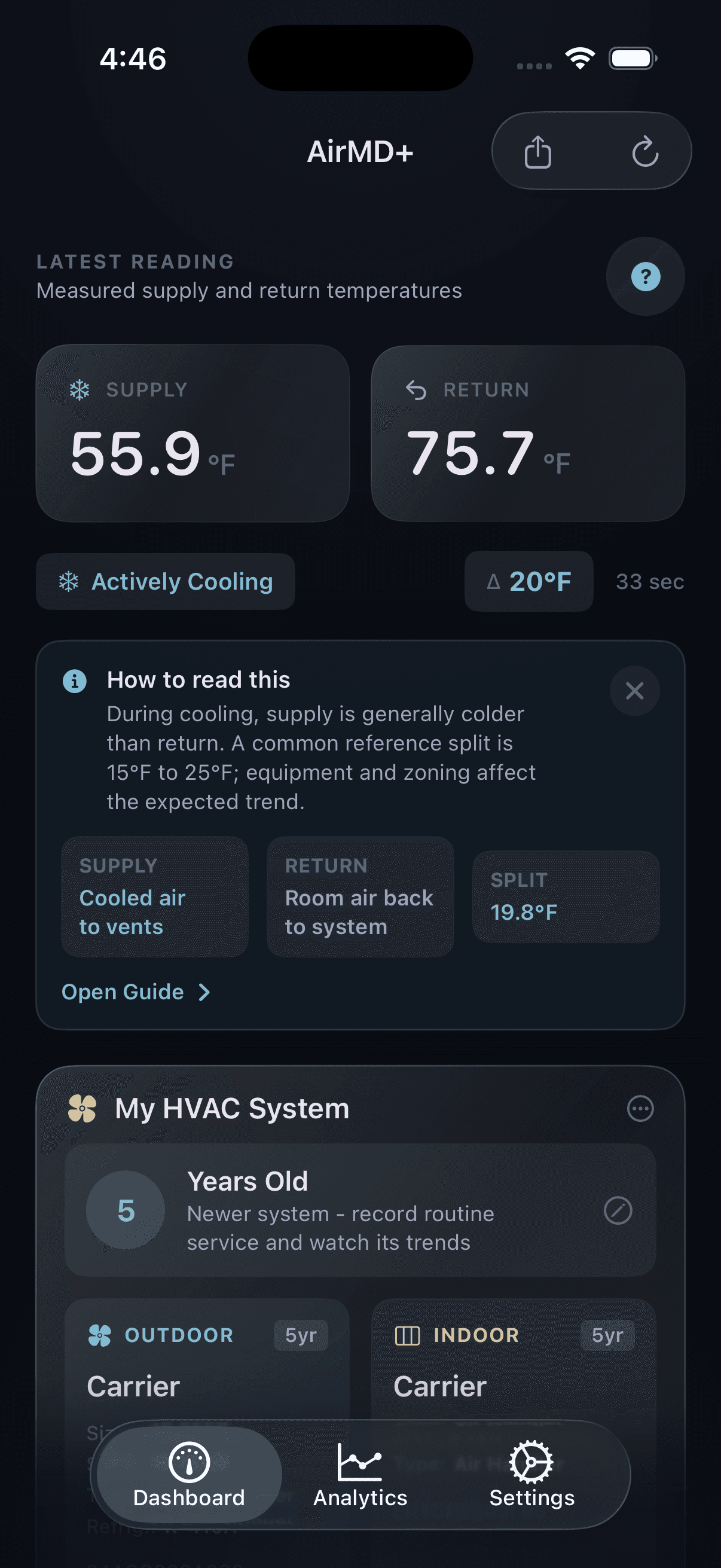
Know both sides.
See supply and return temperatures together, in °F or °C.
Follow the split.
AirMD+ calculates ΔT so you can see how the two readings relate.
Look beyond now.
With Premium, review history instead of judging from one moment.
A small addition. A useful perspective.
Your system already
has a story to tell.
AirMD+ listens with two probes: one for the air your system supplies, and one for the air returning to it. A compatible ESP32 monitor sends those readings over Wi-Fi to your account.
Understand your readingsKeep the monitor and wiring outside hazardous areas.
Use safely accessible probe locations.
For the hands-on homeowner.
Small board.
Make it yours.
A compatible ESP32, two temperature probes, and a little curiosity. AirMD+ keeps the DIY spirit — with an app that brings the readings together.
Your monitor essentials
- 01Compatible ESP32-WROOM board
Including supported Freenove ESP32-WROOM hardware. Correct AirMD+ firmware is required.
- 02Two DS18B20 temperature probes
One supply, one return, with the correct wiring and pull-up resistors.
- 03Power + connectivity
Suitable USB power and a 2.4 GHz personal Wi-Fi network with internet access.
- 04Your iPhone + AirMD+
A matching app and firmware version, signed in to your own account.
Coming with the version 1.4 rollout
Less typing.
More getting started.
New nearby setup pairs compatible monitors without a printed QR label or manually entered monitor ID. It requires the updated app and matching firmware; it is not yet the setup flow in every public app version.
- 1
Find your board.
Power the monitor, sign in, and choose Add Monitor. The app looks for nearby compatible boards over Bluetooth.
- 2
Make it yours.
Select the board. When prompted, hold BOOT for about 2 seconds, releasing before 5 seconds, to confirm physical access.
- 3
Bring it online.
Approve the setup-network prompt, choose your 2.4 GHz Wi-Fi, and let the app confirm the monitor’s connection.
The app handles setup credentials for you. Keep it open until the monitor confirms setup — joining its Wi-Fi network alone isn’t the finish line.
Full setup guide →Start with the essentials
Useful from day one.
Room to go deeper.
Live monitoring is part of the free app. Premium adds history and optional tools for understanding and organizing your system’s information.
Compatible hardware is required for monitor data. Apple displays current subscription pricing and terms before purchase.
The everyday view.
- Supply and return temperatures
- Automatic temperature split
- Live monitor readings
- Device setup and management
A little more context.
- History ranges up to 7 days
- User-requested AI reading summaries
- AI-assisted equipment label scanning
- Filter, check-in, and inactivity reminders
What do I need to use AirMD+?
An iPhone, a compatible ESP32 monitor running AirMD+ firmware, two supported temperature probes, USB power, and a 2.4 GHz personal Wi-Fi network with internet access. The app alone cannot measure your HVAC temperatures. Hardware and any subscription are separate.
Can I build my own monitor?
Yes. The updated DIY flow supports compatible ESP32-WROOM hardware, including the Freenove ESP32-WROOM board, with the correct AirMD+ firmware and two DS18B20 temperature probes. Nearby enrollment is part of the version 1.4 rollout; use a matching app and firmware version. Download the latest firmware package in the DIY hardware section and follow its README for a blank board. Contact support before updating an already provisioned monitor. Not every ESP32 variant or existing firmware image is compatible.
Do I need a QR label or a monitor ID?
Not with the new nearby setup in version 1.4 and compatible firmware. The app finds the board over Bluetooth, asks you to confirm it with its BOOT button, and handles the monitor identity and setup credentials. A private QR label or manual code remains a recovery option for provisioned devices. Older app versions use the earlier setup flow.
Does this work with my heating and cooling system?
AirMD+ is intended for compatible forced-air systems with safely accessible supply and return air locations. Equipment type and sensor placement matter. It is not a thermostat, and it does not control your HVAC system. Ask a licensed HVAC professional if you are unsure about compatibility or safe probe placement.
What does the temperature split tell me?
Delta-T (ΔT) is the difference between the return and supply air temperatures. Following it over time gives context about how your system is operating. Weather, humidity, equipment, operating load, and probe placement all affect it. No single split, app status, or AI summary can diagnose a problem.
What happens when I remove a monitor?
Remove it from Device Management in Settings. This releases its account registration; it is not a remote wipe of the board or a promise to erase historical readings. To add it again, follow the app’s physical setup instructions. A Wi-Fi reset on the board and deletion of your account are separate actions. The support guide explains the updated flow.
Meet your home’s other temperature app.
A clearer view
starts here.
Explore AirMD+ on the App Store Informational monitoring, not professional diagnosis.
For installation, repairs, or safety concerns, consult a licensed HVAC professional.